
Your renovation, no surprises: every payment, every agreement, every photo in one place.
Caderno da Obra writes down what you agreed on the day you agreed to it, keeps each payment next to its receipt, and answers the question that comes up every Sunday: how much have we spent, and how much is left?
For anyone whose renovation lives in a group chat, a camera roll and a spreadsheet that stalled.
The quotes below are real. People wrote them in reviews of other apps and in a forum, and each one links to where it came from. Caderno da Obra was designed from reading them.
I like having everything organized in one place instead of trying to piece together information from emails, notes, and receipts.
Real review, 5 of 5 stars, Jun 2026, of another app: Legible Home, App Store (US)One project, one place: what you agreed, what you paid, the receipt and the photo of the day, all tied to the same room.
[…] by the end I'm rebuilding everything in a spreadsheet just to see whether I actually hit the budget.
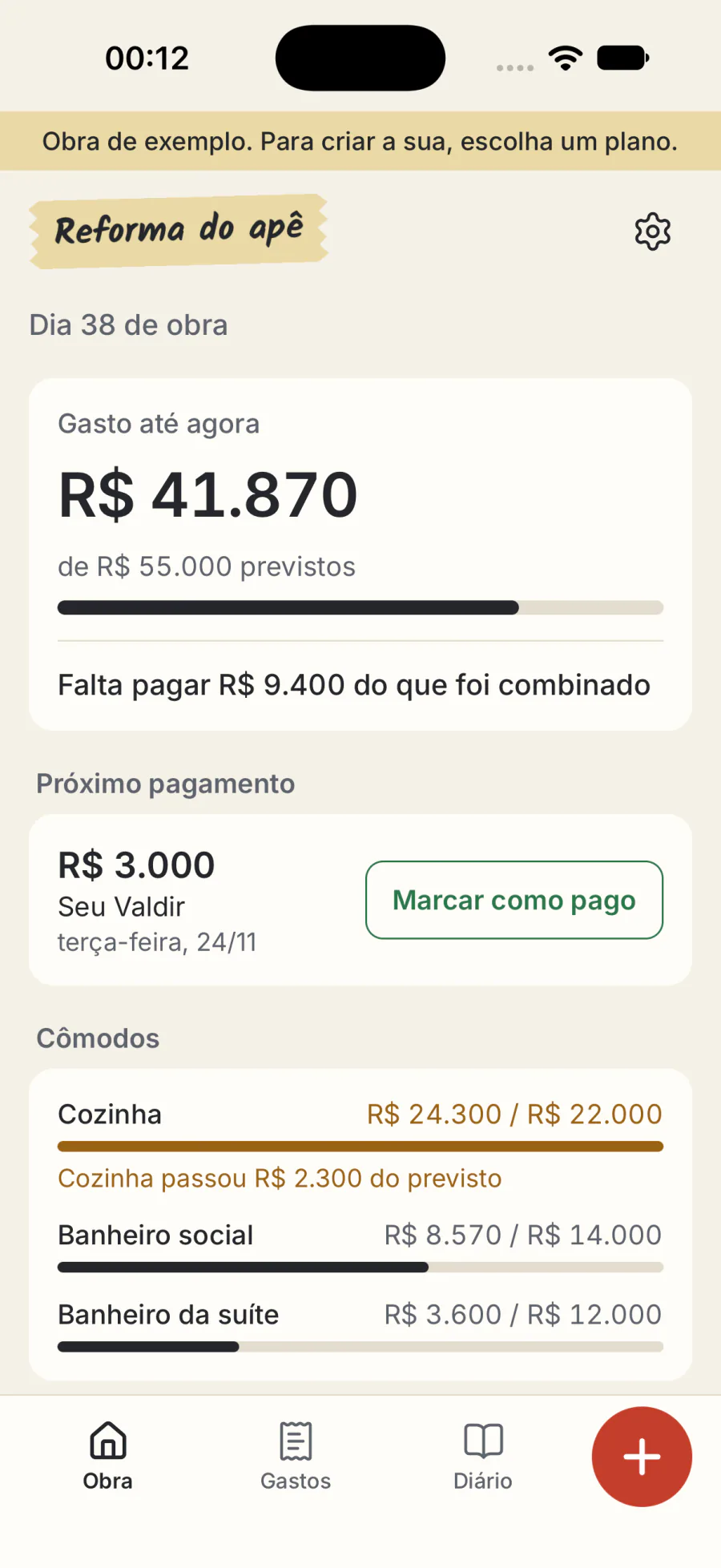
Real forum question, Jul 2026: BiggerPocketsSpent so far, planned and still to pay sit on the first screen every day. You find out in week four, not at the end.
Log the committed number the day you agree to it and receipts become reconciliation instead of discovery.
Real forum reply, Jul 2026: BiggerPocketsThis is the spine of the app. The number goes in the day you agree to it, and every payment after that just brings the balance down.
[…] Antes, muitas informações ficavam perdidas no WhatsApp. […]
Our translation: “[…] Before, a lot of information got lost in WhatsApp. […]”Real review, 5 of 5 stars, Oct 2026, of another app: Obra Controle, App Store (Brasil)The agreement leaves the two-minute voice note and becomes one line: date, amount, who. When someone remembers it differently, you open it and read.
[…] perdi todos os meus regitlstros após o prazo de teste. […] perdi fotos, regustros, dados importantes. […]
Our translation: “[…] I lost all my records after the trial ended. […] I lost photos, records, important data. […]”Real review, 1 of 5 stars, Apr 2019, of another app: Diário de Obra Online, Google PlayWhat you write down is yours. If the plan ends, the project stays open to read and comes out whole: spreadsheet, PDF and a full file with the photos.
[…] Set yourself a reminder to cancel your subscription or you might be stuck with another year. […]
Real review, 3 of 5 stars, May 2022, of another app: HomeZada, App Store (US)A week before a plan renews, the app tells you the date and the amount, with a shortcut to cancel. There is also a pay-once option that never renews.
Four moves, and the project is in order.
It works offline and without an account. You open the sample project, look at everything, and only then decide.
Set up the project
A name, a start date and the rooms: kitchen, hall bathroom, whatever you have. If you like, how much you plan to spend on each. One screen.
Write down the agreement
Who, what, how much and when you pay. Flat price, day rate or change order. The amount counts from the day you agree, not the day you pay.
Keep the payment and the photo
Log the payment and attach the photo of the receipt. In Brazil, the phone reads Pix receipts on its own; anywhere else, you type the amount. Site photos land on the day they were taken.
See what's left
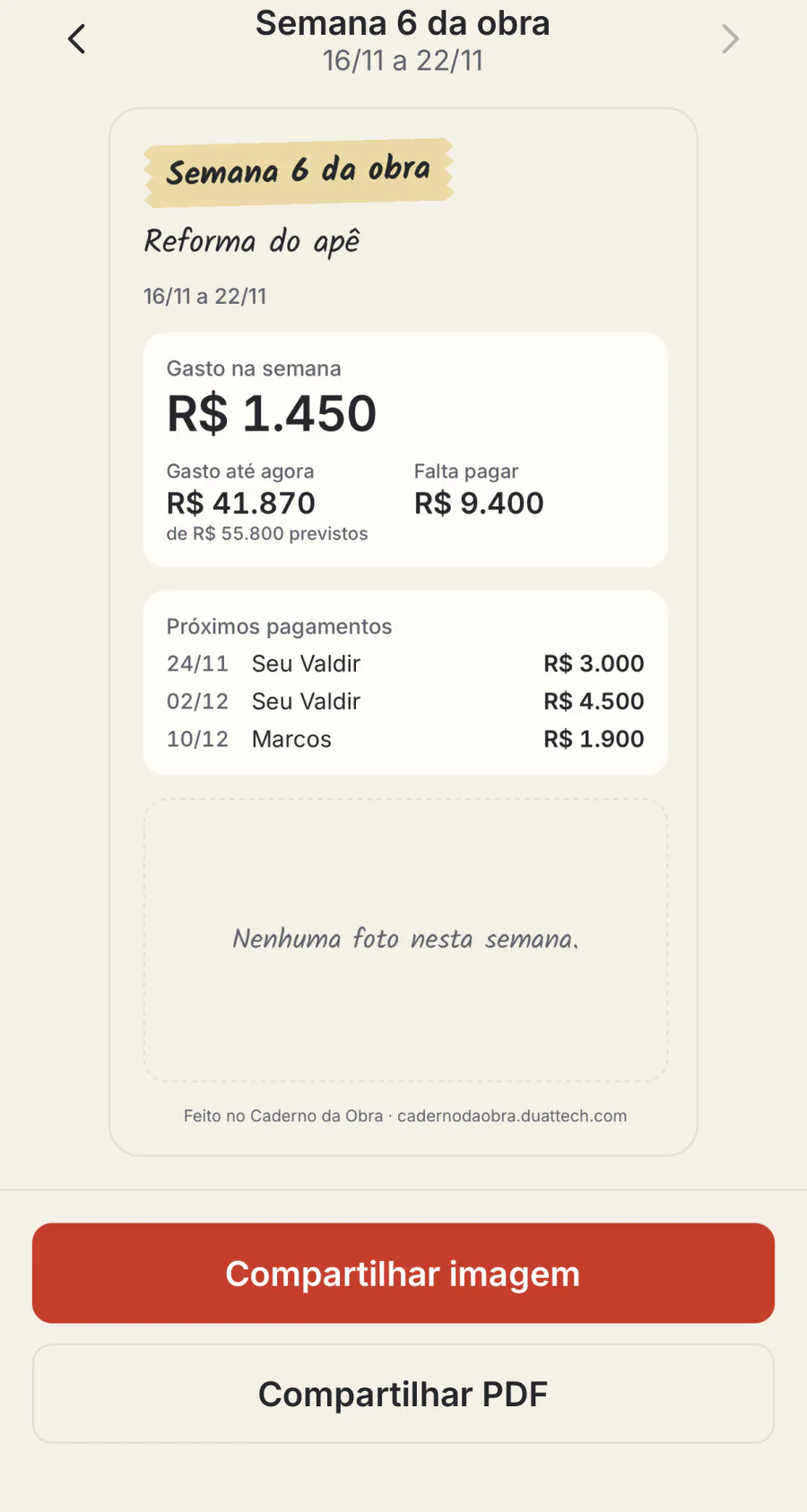
Spent so far, still to pay and the next payment, always on the first screen. On Sunday, the weekly summary goes out as an image or a PDF.
What your phone shows.
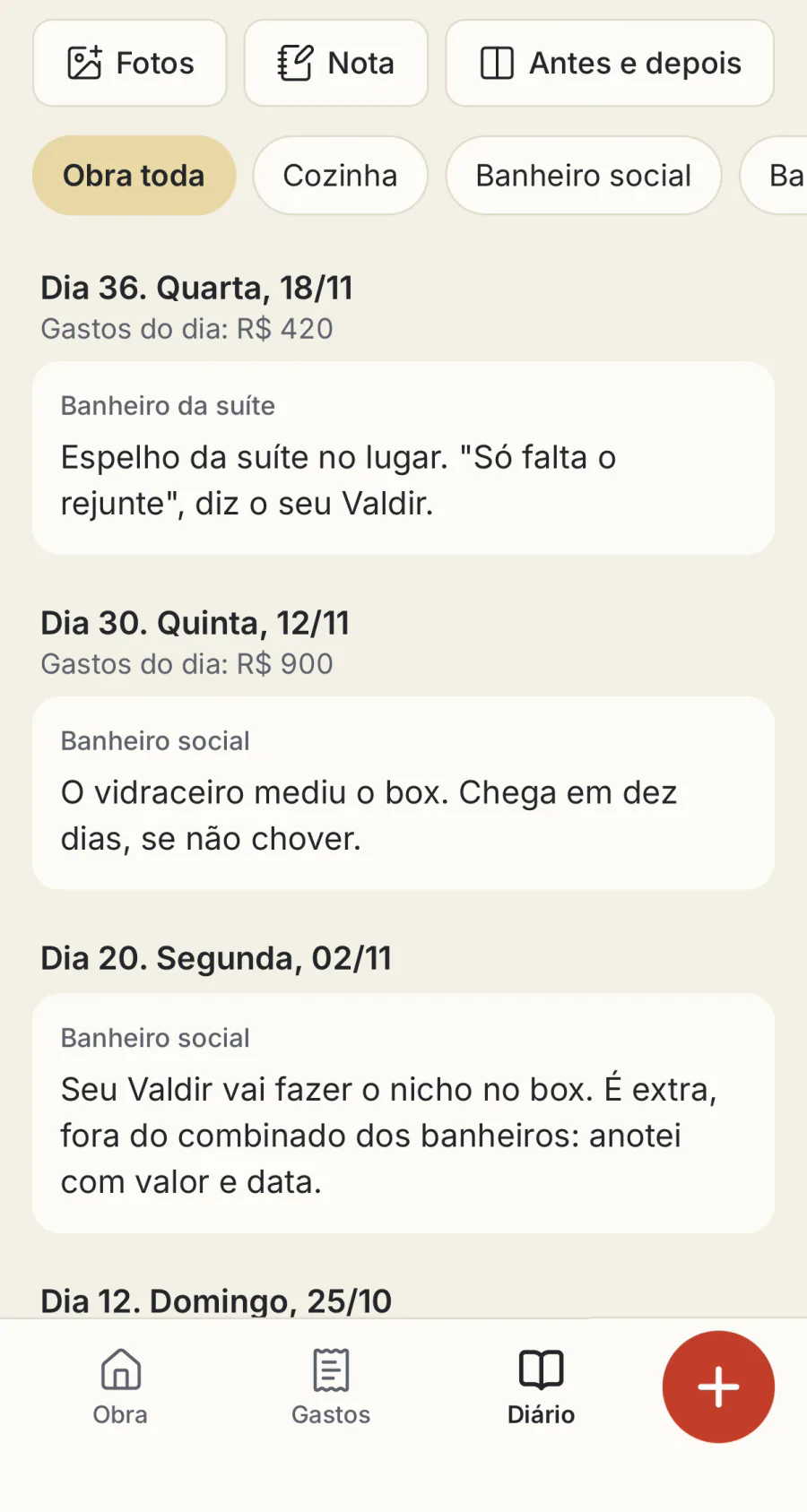
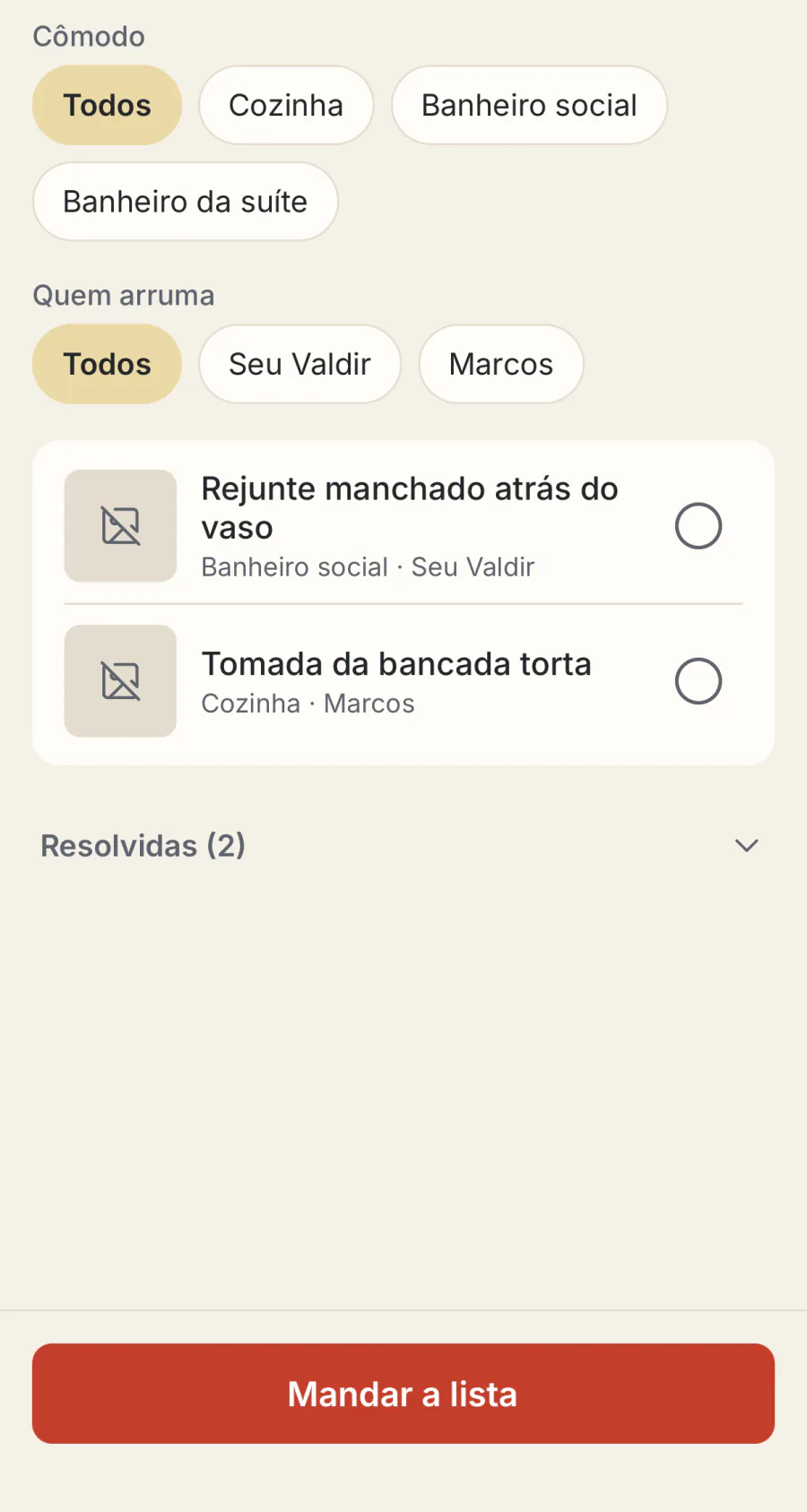
Real screens from the app, with the sample project that opens before you buy: a condo remodel with a kitchen and two bathrooms. The screenshots are in Portuguese, with amounts in Brazilian reais; the app itself comes in English. Names and amounts are sample data.
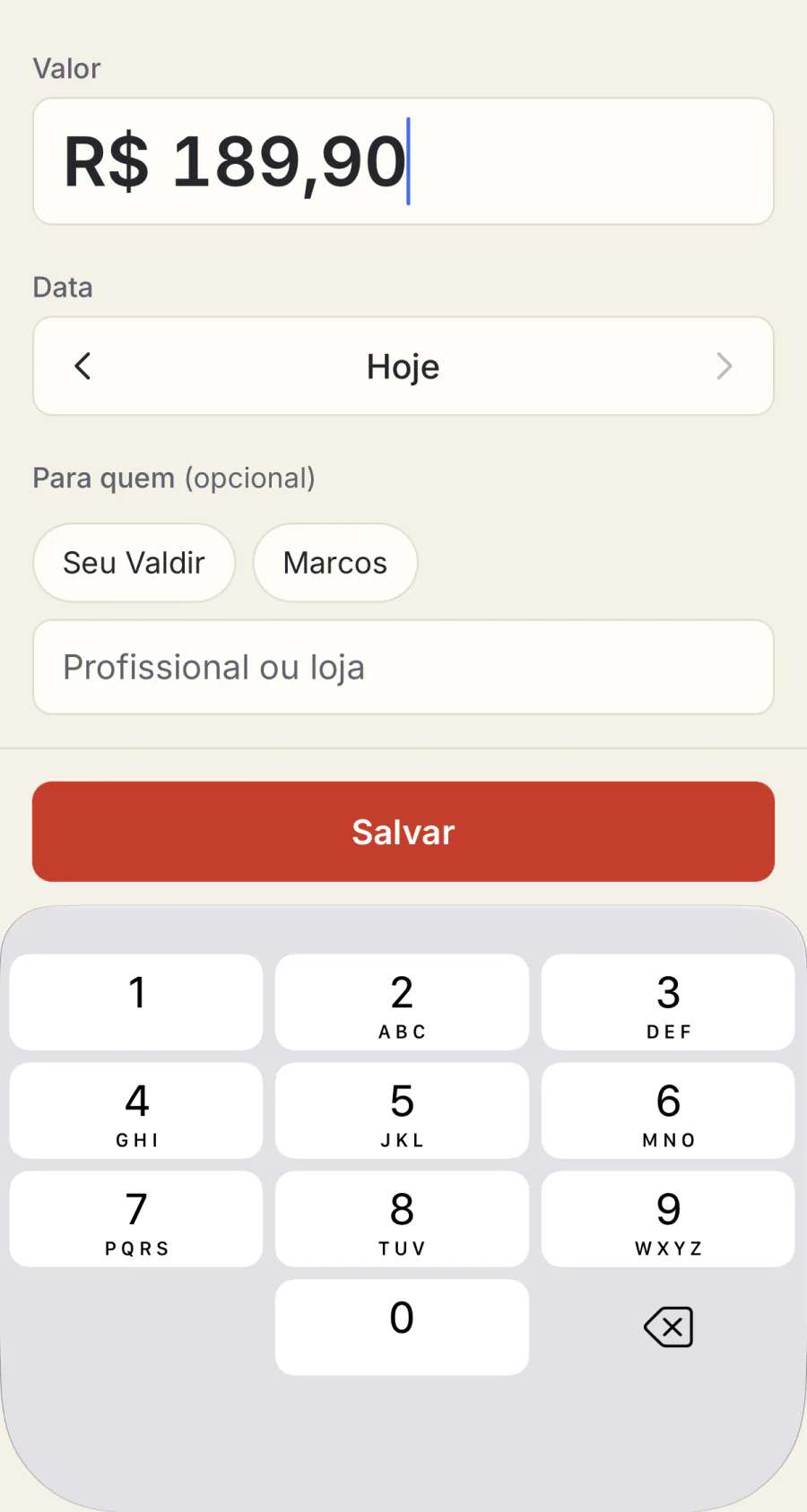
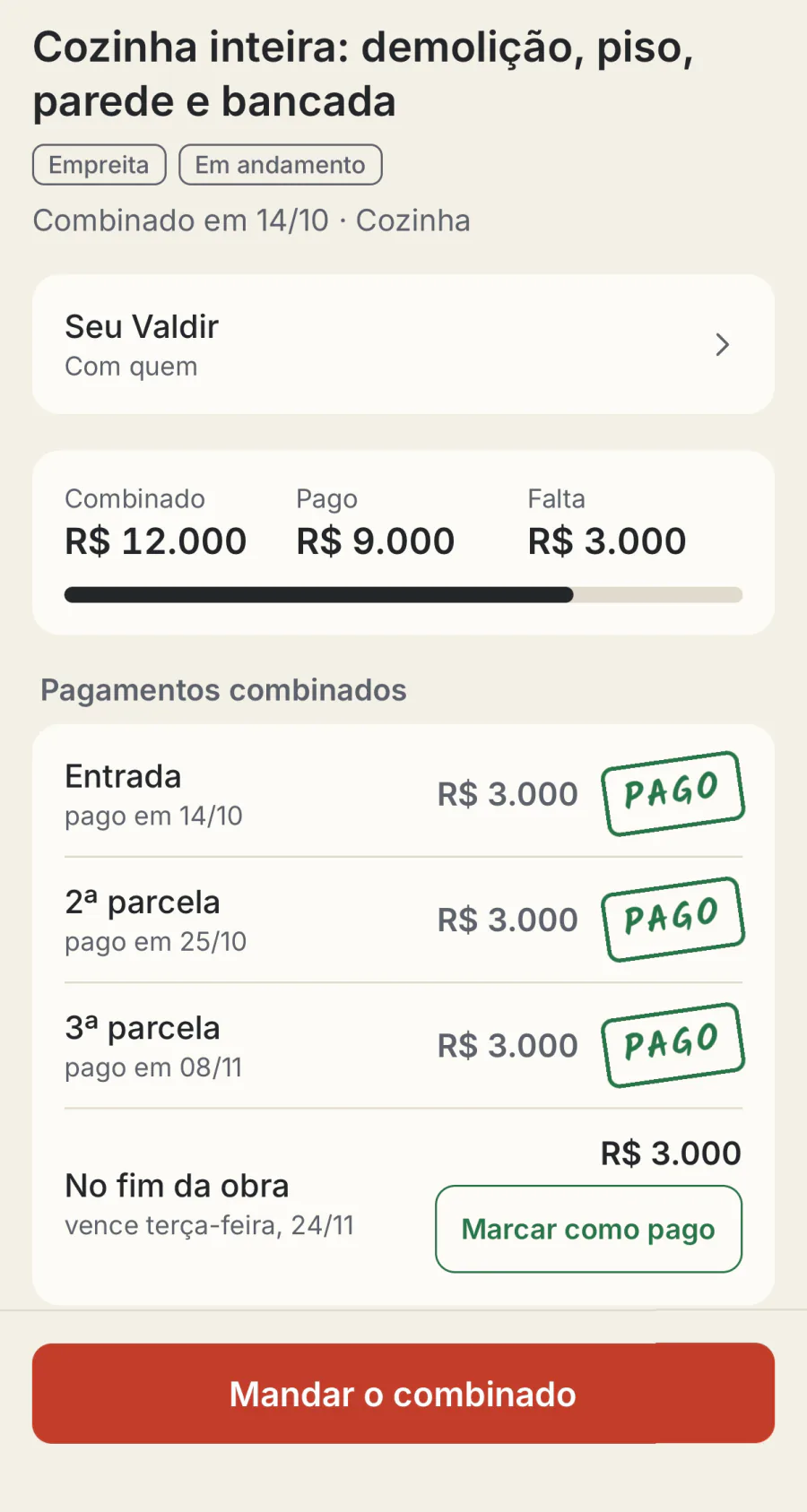
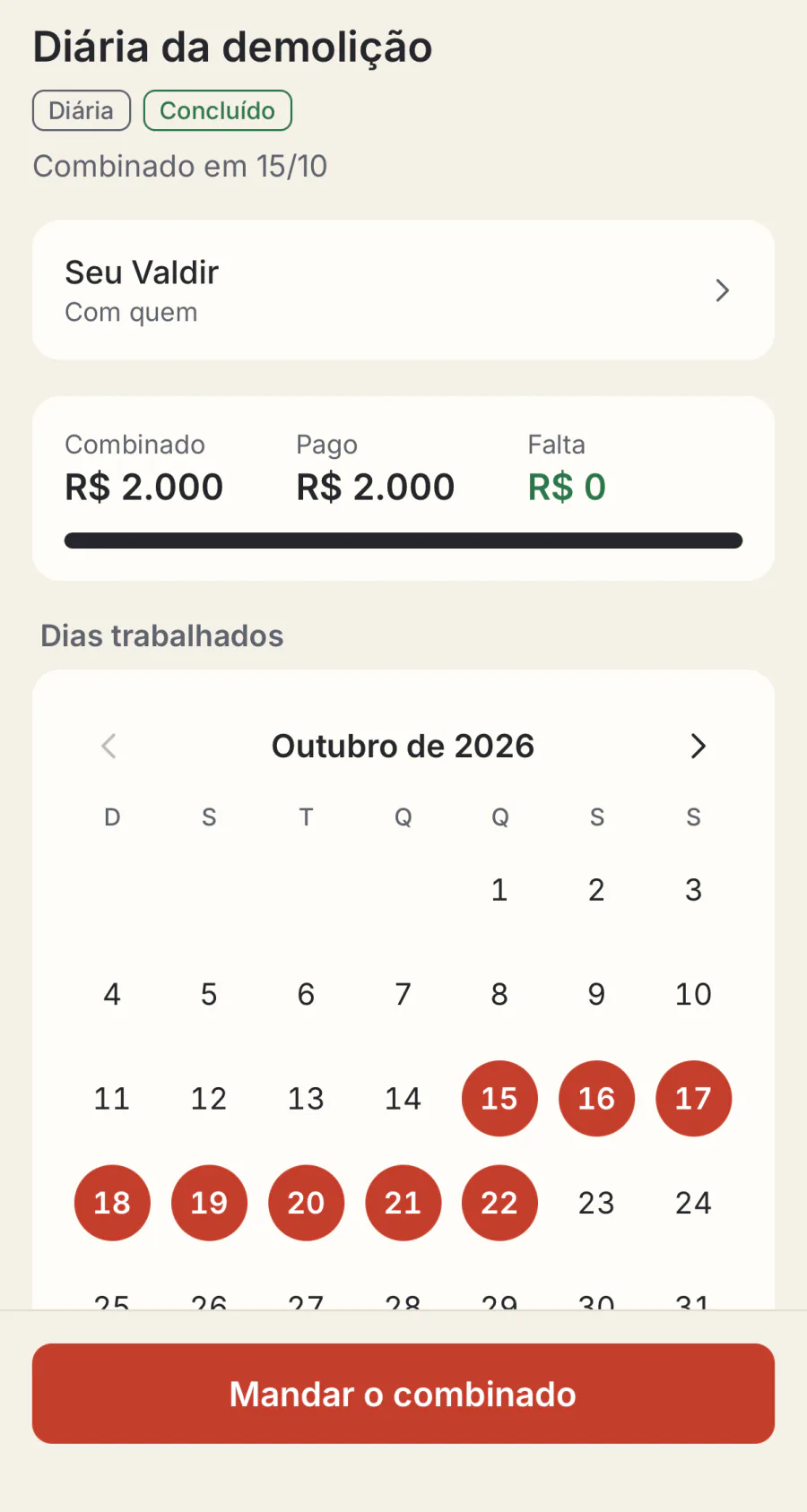
Spreadsheet, camera roll, group chat and paper notebook, next to Caderno da Obra.
Each of these handles one piece. The trouble is that the renovation ends up in four places, and "how much is left?" is in none of them.
| Caderno da Obra | Spreadsheet | Camera roll | Chat app | Paper notebook | |
|---|---|---|---|---|---|
| How much spent, how much left | On the first screen, always | Only if you fill it in every week | Counting receipts one by one | No | Adding by hand |
| What you agreed, with a date | Date, amount, installments and balance | If you add the column | No | In a voice note, somewhere | Yes, if you wrote it then |
| Payment receipts | Kept with the expense. Brazilian Pix receipts are read on the phone | Typed by hand | Kept, among every other photo | Kept, somewhere in the thread | No |
| Change orders apart from the original | A kind of agreement, linked to the original | If you remember | No | No | If you remember |
| Reminder on payment day | On the day, at 9 a.m. | No | No | No | No |
| Photos by day and by room | By day, by room, with captions | No | By date, no room | Scattered | No |
| A summary for the family | A ready image or PDF | A screenshot of the sheet | No | You write it | A photo of the page |
| Works on site, offline | Yes | Depends | Yes | No | Yes |
| What it costs | A plan or a one-time payment; the store shows your local price | Free | Free | Free | The price of a notebook |
A spreadsheet is good, and it is free. If it works for you, keep it: ours is here to download. Caderno da Obra is for people who have already watched the spreadsheet stall in week three.
The price, before you write anything down.
Two plans. The sample project opens for free so you can look at everything; to log your own project, you pick one. There is no free trial and there are no ads.
Logs expenses, agreements and photos. Reads Brazilian Pix receipts on its own, on your phone.
- No limit on the number of projects
- Agreements, installments and a reminder on payment day
- Diary with photos, before and after, and the punch list
- Weekly summary, PDF report and spreadsheet export
- Works offline and without an account
Everything in Essential, and you send chat screenshots and a voice note about the day: the app sorts out what is an expense, an agreement or a payment, and you confirm.
- Uses cloud AI, and a screen tells you so before the first upload
- Nothing is saved until you confirm it
- Comes after Essential, with no promised date
Outside Brazil: these are the Brazilian prices. A price in dollars has not been set yet; the store shows the price in your currency before you pay. How it renews: the 3-month and 6-month plans are subscriptions and renew on their own, at the same price, until you cancel. A week before, the app tells you the date and the amount. The one-time plan is paid once and never renews. How to cancel: in the store itself, under Subscriptions, on the App Store or Google Play. The app has a shortcut in Settings, under Plan. When the plan ends: your project stays open to read, share and export as a spreadsheet, a PDF and a full backup file. What stops is adding new entries.
How much do you still owe the contractor?
The math everyone does in their head on a Saturday, standing in the dust. Put in what you agreed (or the days and the day rate), the change orders and what you have paid. You do not need the app.
Nothing is saved or sent. The math runs in your browser. The currency symbol is just for show: type your own numbers.
Before you download
Is Caderno da Obra for contractors or construction companies?
No. It is for the person paying for their own renovation: a homeowner working with a contractor a relative recommended, with no engineer on site every day. No Gantt charts, no technical reports. Just what you need: the agreement, the payment, the photo and what is left.
Why does the app have a Portuguese name?
"Caderno da obra" means "the job-site notebook". The app was born in Brazil, and this is its working name; it may change before launch. The app itself comes in English and eight other languages.
Does it read my receipts automatically?
Only Brazilian ones. On-device reading recognizes Brazilian Pix receipts and the like, with amounts in R$ and labels in Portuguese. Outside Brazil, you attach the photo of the receipt to the expense and type the amount. Everything else works the same anywhere.
Do I need to sign up?
No. The app opens straight into the sample project, without asking for a name, an email or any ID number. The Essential plan works entirely without an account.
Is there a free trial?
No timed trial. Instead, the whole sample project opens before you buy: 38 days of a remodel, expenses, agreements, photos and a summary, all there to tap through. To log your own project you pick a plan, and the price is written down first.
How much does it cost in my country?
Prices are set in Brazil for now (Essential starts at R$ 39.90 every 3 months, or R$ 129.90 once). A dollar price has not been decided. The store always shows the price in your currency before you pay.
What happens to my project if I stop paying?
It stays open to read, share and export: spreadsheet, PDF and a full backup file with the photos. What stops is adding new entries. The app does not lock up what you already wrote down.
Does my data go to a server?
On the Essential plan, without an account, your project stays on your phone. The purchase goes through the store, and the proof of purchase goes to our server to check your plan. What else leaves the phone, and when, is on the privacy page.
Can two people log on the same project?
Not yet. Shared projects, with an account and an invite, are being built and have no promised date. Today, whoever splits the bill with you gets the weekly summary as an image or PDF, and the full backup file moves the whole project to another phone.
Does the app keep an eye on the contractor?
No. No time clock, no location, no hidden photos. Caderno da Obra writes down what the two of you agreed, with a date, so you both remember it the same way. A written agreement protects you, and it protects the honest contractor, which is most of them.
When is it out, and where?
Soon, on the App Store and Google Play, for iPhone (iOS 16.4 or later) and Android (7 or later). At first it will not be in the stores of the European Union, the European Economic Area or the United Kingdom. There is no waiting list. Meanwhile, the spreadsheet and the calculator on this site are yours, free.